

Deploy Apps with AI Using Circle and Vercel Skills
Building a stablecoin-powered app and getting it live are two different challenges.
Most workflows still treat them separately. You build first, then figure out how to ship it.
Now, with agent skills, both can happen in the same workflow.
skills.sh is an open agent skills ecosystem where developers can discover and install reusable skills for AI coding agents.
Circle Skills is available in that ecosystem, giving agents best-practice guidance for USDC payments, crosschain transfers, wallets, and smart contracts, along with real-time SDK and documentation context. Under the hood, this includes access to production-grade infrastructure such as RPC, indexing, webhooks, and secure wallet flows. The full set of Circle Skills continues to evolve and is available in the skills directory.
In the same workflow, developers can use Vercel Skills to move from local build to deployed app.
Together, that creates a single flow: install Circle Skills, install Vercel Skills, prompt your agent, then build and deploy in one workflow.
Install the skills
Start by installing Circle Skills and Vercel Skills:
npx skills add https://github.com/circlefin/skills
npx skills add vercel-labs/agent-skills
If prompted to select skills and you’re unsure, select all. The agent reads metadata first and loads only what it needs as the task unfolds.
Open your AI coding agent
Once the skills are installed, open your coding agent of choice. This workflow works with agents that support skills, such as Claude Code or Codex. At this point, setup is done. The next step is to describe what you want to build.
Define the app in a prompt
For example, you might want to build a simple payment request app on Arc Testnet:
- create a payment request
- generate a shareable link
- allow someone to pay in USDC
- verify the payment onchain
- deploy the app
Here is the prompt:
Using Circle skills, build a simple payment request application on Arc Testnet where the user creates a payment request (amount, description, recipient) and get a shareable payment link. So when someone visits the link, they can see the details and make payment directly to the wallet address. The app should also be able to verify the payment onchain and updates the status to paid after polling. Use Vercel skills to deploy.
The agent loads context before building
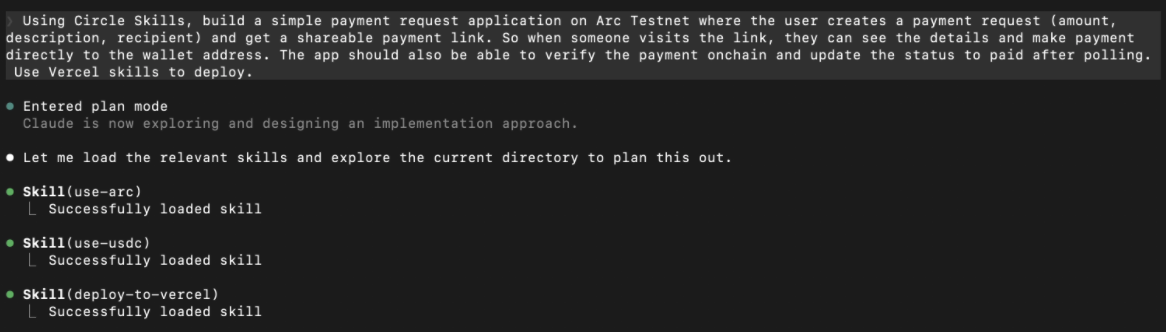
After receiving the prompt, the agent does not immediately start generating code.
It first loads the relevant skills:
use-arcuse-usdcdeploy-to-vercel
Then it reads the underlying references before building.
This is the key workflow:
prompt → skills loaded → context read → build → deploy
Instead of guessing how to:
- configure Arc
- handle USDC transfers
- structure wallet flows
- deploy the app
the agent uses the context provided by the installed skills.
Applying Circle context
Once Circle Skills is loaded, the agent applies Arc and USDC patterns directly.
For example, configuring the client for Arc Testnet:
import { createPublicClient, http } from "viem";
import { arcTestnet } from "viem/chains";

const publicClient = createPublicClient({
  chain: arcTestnet,
  transport: http(),
});
And using the canonical USDC contract on Arc Testnet:
const USDC = "0x3600000000000000000000000000000000000000"; // Arc Testnet USDC

const balance = await publicClient.readContract({
  address: USDC,
  abi: erc20Abi,
  functionName: "balanceOf",
  args: [address as `0x${string}`],
});
This ensures the app is using:
- the correct Arc network configuration
- the canonical USDC contract
- standard ERC-20 interaction patterns
This is where Circle Skills adds value. They guide the agent toward the correct onchain implementation from the start.
From build to deployment
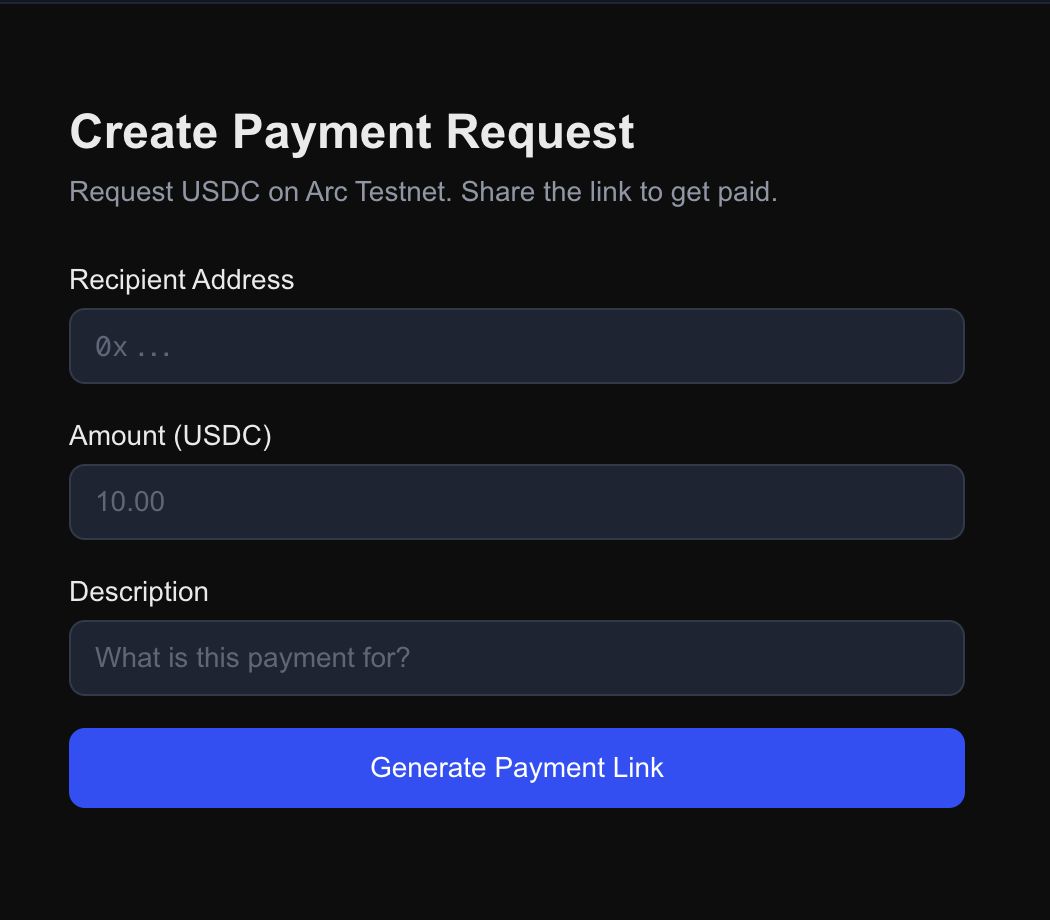
Once the app is generated, it still needs to be usable. This is where Vercel Skills come in. The same workflow moves from a local build to a deployed app with a shareable URL, turning a working implementation into something someone else can actually use.
Circle Skills handles the money flow. Vercel Skills handle deployment.
Try the workflow yourself
Install Circle Skills and Vercel Skills, open your coding agent, and describe the app you want to build. You can explore the deployed example here.
Try your own ideas, prompt the agent, and let it build and deploy in the same workflow.
That is the shift from prompt to deployment.
Circle Technology Services, LLC (“CTS”) is a software provider and does not provide regulated financial or advisory services. You are solely responsible for services you provide to users, including obtaining any necessary licenses or approvals and otherwise complying with applicable laws. For additional details, please click here to see the Circle Developer terms of service.
USDC is issued by regulated affiliates of Circle. See Circle’s list of regulatory authorizations.
EURC is issued by regulated affiliates of Circle. See Circle’s list of regulatory authorizations.
Arc testnet is offered by Circle Technology Services, LLC (“CTS”). CTS is a software provider and does not provide regulated financial or advisory services. You are solely responsible for services you provide to users, including obtaining any necessary licenses or approvals and otherwise complying with applicable laws.
Arc has not been reviewed or approved by the New York State Department of Financial Services.
The product features described in these materials are for informational purposes only. All product features may be modified, delayed, or cancelled without prior notice, at any time and at the sole discretion of Circle Technology Services, LLC. Nothing herein constitutes a commitment, warranty, guarantee or investment advice.